
Appointment confirmation on WhatsApp, with no phone calls.
WhatsApp appointment confirmation is the message a patient receives before the booked time to confirm or say they can't make it. In Pro365 GO, HartSystem's dental clinic management software, it goes out on its own at the time you set. Through the link, patients confirm in one tap, open the route to your clinic and fill in their health form.
- Sent on its own, right on time
- One-tap confirmation
- Route and health form in the same link
 Pro365ProDent Odontologia
What is appointment confirmation via WhatsApp?
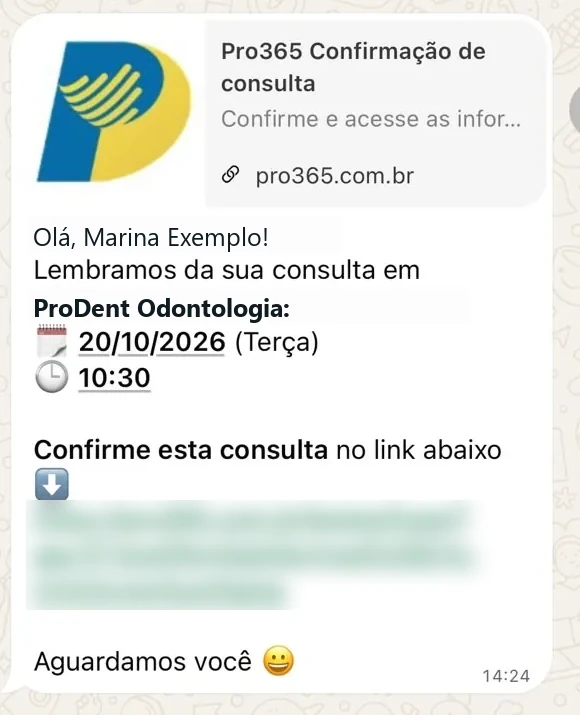
Dental appointment confirmation via WhatsApp means sending the patient a message before the booked time so they can confirm or let you know they can't make it. In Pro365 GO, confirmation is automatic: the confirmation agent sends messages at the time you choose, replies appear on the appointment confirmation screen and the front desk sees who hasn't replied in time to reschedule. The message carries a link where the patient confirms in one tap, opens the route in Uber, Waze or Google Maps and fills in the health form.
- AutomaticSent on its own, at the time you schedule
- VisibleConfirmed and unconfirmed on one screen
- MeasuredCompare messages and track no-shows in your KPIs
Pro365 GO

Your patient confirms in one tap. And knows how to get there.
Every reminder carries a personal link to the Pro365 GO confirmation page. There the patient sees the date, time and dentist, confirms with one tap, opens directions in Google Maps, Waze or Uber, contacts the clinic and saves the appointment to their phone's calendar. No app, no password, in their own language.
Tap the buttons on the phone: everything works like the real page.
Confirming appointments by hand vs with Pro365 GO
| By hand | Pro365 GOWhatsApp | |
|---|---|---|
| Sending the confirmation | The front desk calls or texts each patient, one by one. | The message goes out on WhatsApp on its own, at the time the clinic chose. |
| Knowing who confirmed | It's noted on paper or in someone's memory. | The schedule shows who confirmed and who hasn't replied yet. |
| Patient who can't come | The clinic often finds out at the last minute, with an empty chair. | They let you know in advance through the confirmation, and the slot can go to someone else. |
| Getting to the clinic | The patient looks up the address on their own. | Opens Uber, Waze or Google Maps from the link, address included. |
| Health history | Filled in on paper at the front desk before the visit. | The patient fills in Fast-in on their phone before arriving. |
| Measuring no-shows | Nobody knows exactly how many visits were missed. | No-shows and confirmations show up in the dashboards. |
From schedule to reply, without a single call
- 01You choose when to send
In the confirmation agent, pick the lead time, send time and message. You can have more than one agent.
- 02The patient gets it on WhatsApp
The message arrives with name, date, time, provider and a link. There the patient confirms, opens the route in Uber, Waze or Google Maps and fills in the health form with Fast-in.
- 03The reply shows on screen
The confirmation screen shows each appointment, the last reminder and the confirmation.
- 04No reply becomes a to-do list
Filter only today's or upcoming unconfirmed visits and reach the rest in time.
Build your clinic's confirmation plan
Choose how you want to confirm. The plan shows when each message goes out, how predictable your schedule becomes and what to adjust.
In Pro365 GO, all of this is set up in the confirmation agent.
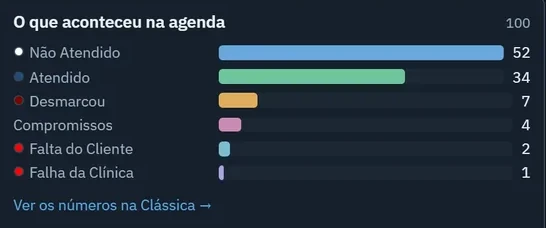
No-shows among confirmed vs. unconfirmed
Splitting no-shows into two groups shows whether the issue is the message or patients who never reply. Pro365 GO KPIs show what happened in the schedule over the period.
What a good confirmation message includes
 No procedure or diagnosis
Confirmation, screen by screen
Where the patient's reply shows up once the message goes out.
- 01Appointment confirmation
By period and by dentist, with filters to see only confirmed or only unconfirmed appointments.
- 02In the schedule
Each dentist's week, with every booked visit and the open slots to fit in cancellations.
- 03No-shows in the dashboards
Patient no-shows kept apart from clinic no-shows, next to seen visits and cancellations.
Pro365 GO is the new ProDent
This tool grew out of more than three decades of ProDent working alongside dental clinics. Now it's 100% web, comes with Pro365 AI and keeps the same HartSystem support team. If you use ProDent, the team helps bring your data over and trains your staff.
Our story- since 1993building software only for dentistry
- 100% webin the browser on computer, tablet and phone
- A schedule that confirmsslots, confirmations and recalls in one place
In our clients' words.
Having ProDent in my clinic for years let me reinvent the way I work and stay organized. I've watched ProDent evolve without ever standing still, always looking ahead and bringing in new technology. The whole team works efficiently and quickly. Those who have it know this; those who don't should get it soon. It's the essential tool for our day-to-day. Everything, and I mean everything, apart from the clinical work with the patient, I do in ProDent. ProDent is fantastic!!!

I've been a user since 1998, and in all that time I haven't found another system that serves me so well... I recommend it to any dental professional.

I started using this tool and it made all the difference in managing my clinic. From then until today, I haven't found any dental clinic management software as efficient, practical and easy to use as [ProDent]. Every update adds features that are not only necessary but make my day-to-day easier. The people who built this software listen to dentists' suggestions and turn them into reality. Congratulations to HartSystem, and thank you for the partnership.

The software helps by getting marketing, financial and communication data quickly. I'm fully satisfied with the product, the guidance and the maintenance, always serving us quickly and kindly.

When I decided to computerize my clinic in 1995, I chose a company that was still young but, in my view, had a very promising product. I couldn't have made a better choice. Over the years ProDent has proven to be an excellent management tool, and HartSystem has always given me the best support. All of this makes me a loyal and satisfied client. I recommend it.

Frequently asked questions
How does WhatsApp appointment confirmation work?
Pro365 GO builds the list of appointments to confirm and the confirmation agent sends the WhatsApp message at the time you choose. The reply shows on the confirmation screen, along with the last reminder sent.
How far in advance should I confirm?
A common practice is confirming one or two days ahead, leaving time to reschedule and offer the slot to someone else. In Pro365 GO, you choose the lead time and send time.
Can I see who hasn't confirmed yet?
Yes. The confirmation screen filters confirmed and unconfirmed appointments, for today or the coming days, by provider.
Can I use more than one confirmation message?
Yes. You can have more than one agent for the same purpose and compare in your KPIs which works best for your patients.
Does WhatsApp confirmation eliminate no-shows?
It reduces them but doesn't eliminate them. Confirmation shows early who isn't coming and leaves time to reschedule. Non-responders need a second contact, and the waiting list helps fill open slots.
Can the confirmation message include treatment details?
Ideally not. Date, time, provider and address are enough. Procedures and diagnoses stay in the records, for patient privacy.
Does the patient need an app to confirm the appointment?
No. The link in the message opens the confirmation page in the phone's browser, with no login or password. There the patient confirms, gets directions, contacts the clinic and saves the appointment to their calendar.
Is the confirmation page available in other languages?
Yes. It opens in Brazilian and European Portuguese, English and Spanish, and the patient can switch language at the top of the page.
Explore the other tools in Pro365 GO
Every tool uses the same information as the others, so nothing has to be typed twice.
Discover a new way to run your dental clinic.
See how Pro365 GO connects scheduling, clients, treatments, finances, KPIs and artificial intelligence.
Talk to a specialist