
How to organize your dental clinic's finances
To organize a dental clinic's finances, record every payment and bill in the same system as your schedule, track daily what came in and what's due, automate payment reminders and overdue notices, and close the books with KPIs. In Pro365 GO, HartSystem's dental clinic management software, payments, bills, bank reconciliation and collections are connected.
By Andreas Hartmann, CEO of HartSystem · updated October 15, 2026
Does your clinic show these signs?
Tick what happens today. It's quick, and you can get the result by email.
Tick the signs that are part of your routine.
Organize your finances in practice
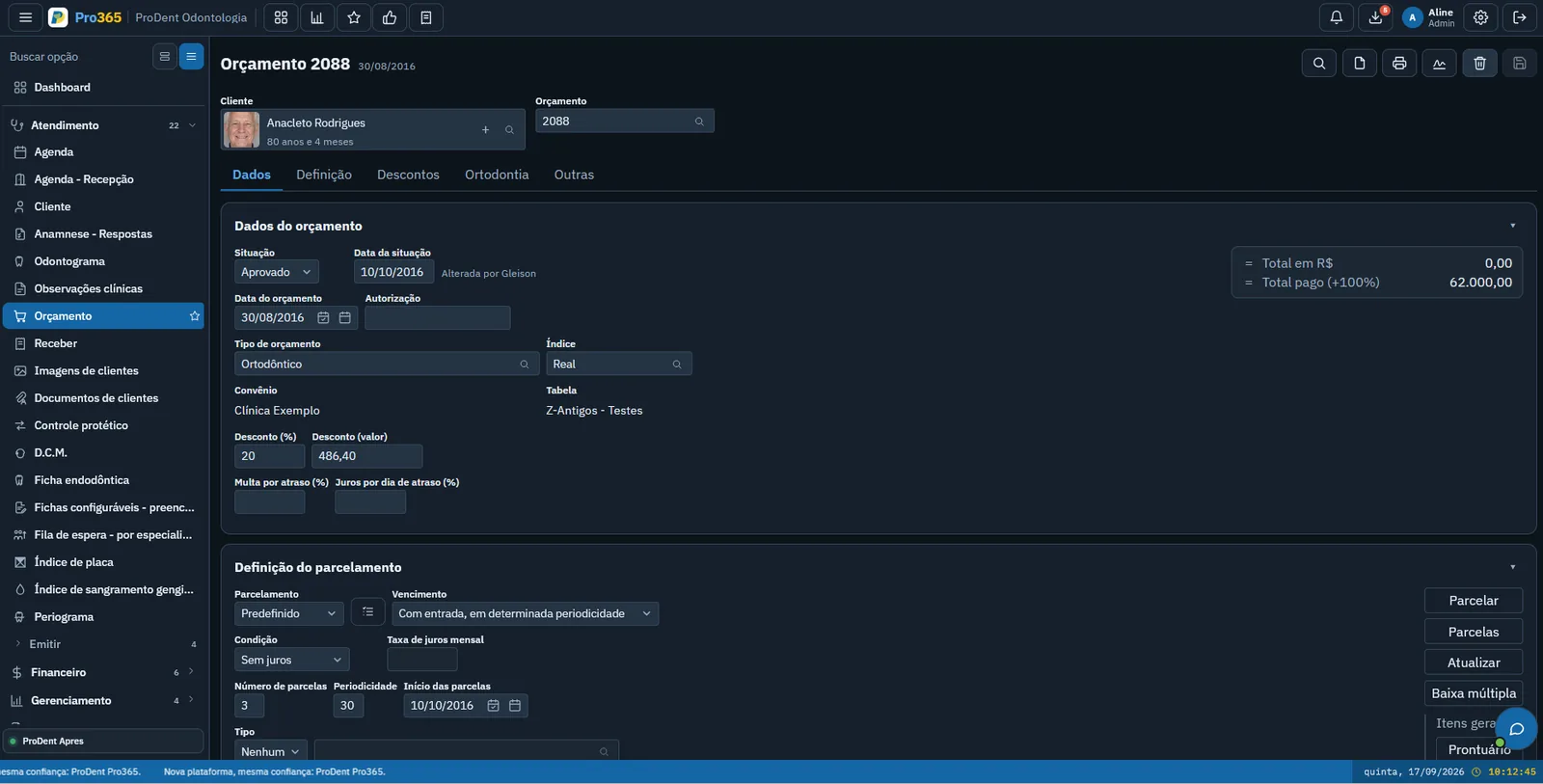
Record each payment linked to the client and treatment plan, with installments and payment method.
Log fixed and variable expenses with due dates and know what needs paying each day.
Track each account's transactions and check that the system balance matches the bank.
Close the day by checking how much came in through each payment method.
See who has overdue installments, for how long and how much, in a single list.
Know how much each provider is owed based on what they produced in the period.
When a payment comes in, it is reconciled automatically, with no manual check.
AutomaticCard, cash, transfer, insurance and more: set up the methods your clinic uses.
Clients get a WhatsApp reminder before each due date.
AutomaticIf an installment goes unpaid, the client gets a polite message, without anyone needing to remember.
AutomaticWhat is your clinic's break-even point?
Break-even is the minimum revenue your clinic needs to cover all monthly costs. Enter your numbers:
What every clinic manager needs to know
| Metric | What it shows | How to calculate |
|---|---|---|
| Cash flow | A record of everything coming in and going out, day by day. It shows whether there'll be money to pay bills in the coming weeks. | Balance = inflows − outflows for the period |
| Overdue rate | The share of what's already due that clients haven't paid. | Overdue rate = overdue unpaid ÷ total due × 100 |
| Break-even point | The minimum revenue to cover all monthly costs. Above it, the clinic makes a profit. | Break-even = fixed costs ÷ (1 − variable cost %) |
| Average ticket | How much revenue, on average, each client seen generated in the period. | Average ticket = period revenue ÷ clients seen |
Pro365 GO finance in action
Cash, receivables and reports in the clinic's day-to-day, in the same system as the schedule.
Organized finances start across the whole system.
In Pro365 GO, the new ProDent, estimates, finance, invoicing, metrics and Pro365 AI talk to each other. Incoming money shows up on the dashboard, so you run the clinic with visual numbers, not spreadsheets.
- Users and permissionsEach person sees only what their permission allows, and the audit log records who touched each payment.
- ScheduleA full schedule is what becomes revenue: occupancy and no-shows sit next to the finances.

How much came in this month?
18% more than last month. Want it by payment method?
Pro365 GO is the new ProDent
This tool grew out of more than three decades of ProDent working alongside dental clinics. Now it's 100% web, comes with Pro365 AI and keeps the same HartSystem support team. If you use ProDent, the team helps bring your data over and trains your staff.
Our story- since 1993building software only for dentistry
- 100% webin the browser on computer, tablet and phone
- Finances up to dateinstallments, collections and cash flow without spreadsheets
Frequently asked questions
What's the difference between revenue and profit?
Revenue is everything the clinic takes in. Profit is what's left after all fixed and variable costs. A clinic can have high revenue and low profit.
How do I reduce overdue payments?
Set payment terms in the treatment plan and let Pro365 GO automatically send reminders before due dates and polite notices after. No one has to remember to collect.
How often should I review finances?
Ideally, track inflows and due dates daily, close cash every day and review monthly KPIs at least weekly.
Which payment methods can I track?
Any payment method you set up, such as card, cash or bank transfer. The dashboard shows how money came in, for any period you choose.
Discover a new way to run your dental clinic.
See how Pro365 GO connects scheduling, clients, treatments, finances, KPIs and artificial intelligence.
Talk to a specialist