
A patient cancelled this morning
In Pro365 GO
The slot shows as open right away, and the front desk calls someone from the waiting list.
Online dental scheduling is a clinic schedule that runs over the internet, on any device. In Pro365 GO, HartSystem's dental clinic management software, it organizes slots by provider and period, confirms appointments automatically via WhatsApp, shows the front desk who has arrived and sends every visit straight into your KPIs.
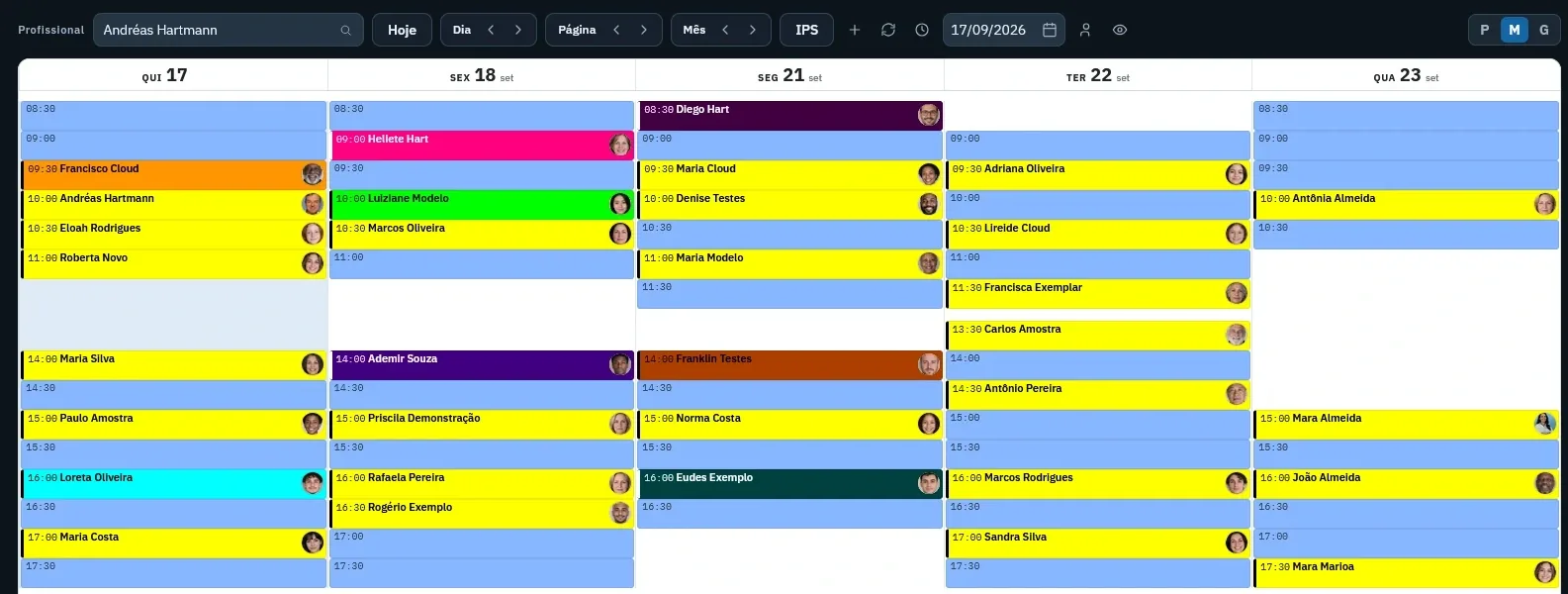
Online dental scheduling is the system a clinic uses to book, confirm and track each provider's appointments over the internet, on any device. In Pro365 GO, the schedule shows open and booked slots by provider and period, sends automatic WhatsApp confirmations, alerts the front desk when the patient arrives and feeds every visit into the clinic's KPIs.
Follow Andreas Hartmann's 10:00 appointment. Click each step.
Move the sliders to match your clinic and see how many slots go empty each month and what they could bring in.
A full schedule isn't luck. It's a routine: one look a day, always in the same place.
Open each provider's period view and spot the open slots before the week starts.
In Pro365 GO: open slots in blueFollow-ups and maintenance visits fill open slots before any campaign. A cancellation opens a spot for the waiting list.
In Pro365 GO: automatic follow-up remindersConfirmations go out on WhatsApp at the time you set. The front desk only calls those who didn't reply.
In Pro365 GO: confirmation agentCompare booked time with minutes actually seen. Visits that always run over push the whole day; ones that always end early waste time.
In Pro365 GO: minutes seen in the dashboardsOccupancy, no-shows and cancellations show whether the week was good or just busy. Ask Pro365 AI what changed.
In Pro365 GO: dashboards and Pro365 AIPro365 GO is 100% web. The manager checks the day on a phone, the dentist sees upcoming patients on a tablet and the front desk works on the computer, all on the same schedule.
The slot shows as open right away, and the front desk calls someone from the waiting list.
The period view shows open and booked slots, and KPIs show what happened in the schedule this month.
The schedule opens on a phone, with a login, and shows the day's upcoming patients.
Confirmations go out on their own via WhatsApp, and the front desk screen shows who has arrived and who's next.
| Metric | What it shows | How to calculate |
|---|---|---|
| Schedule occupancy rate | How much of the providers' available time was filled with appointments in a period. | Occupancy = booked slots ÷ available slots × 100 |
| Idle time | Available clinical time that passed without an appointment. It's capacity the clinic already pays for and doesn't use. | Idle hours = available hours − booked hours |
| No-show rate | The share of booked appointments where the patient neither came nor cancelled. | No-shows = missed appointments ÷ booked appointments × 100 |
From open slot to dashboard: what the front desk, the dentist and the manager see every day.
Open slots show in blue and each appointment shows the time and the patient's name. View it by day, by page or by month.
Who arrived, who is being called and who is already being seen, with Arrived, Call and Start visit buttons.
The period's appointments with each confirmation status, so the front desk can follow up with anyone who hasn't replied.
In the dashboards: seen, not seen, cancellations, commitments, patient no-shows and clinic no-shows for the period.
This tool grew out of more than three decades of ProDent working alongside dental clinics. Now it's 100% web, comes with Pro365 AI and keeps the same HartSystem support team. If you use ProDent, the team helps bring your data over and trains your staff.
Our storyHaving ProDent in my clinic for years let me reinvent the way I work and stay organized. I've watched ProDent evolve without ever standing still, always looking ahead and bringing in new technology. The whole team works efficiently and quickly. Those who have it know this; those who don't should get it soon. It's the essential tool for our day-to-day. Everything, and I mean everything, apart from the clinical work with the patient, I do in ProDent. ProDent is fantastic!!!

I've been a user since 1998, and in all that time I haven't found another system that serves me so well... I recommend it to any dental professional.

I started using this tool and it made all the difference in managing my clinic. From then until today, I haven't found any dental clinic management software as efficient, practical and easy to use as [ProDent]. Every update adds features that are not only necessary but make my day-to-day easier. The people who built this software listen to dentists' suggestions and turn them into reality. Congratulations to HartSystem, and thank you for the partnership.

The software helps by getting marketing, financial and communication data quickly. I'm fully satisfied with the product, the guidance and the maintenance, always serving us quickly and kindly.

When I decided to computerize my clinic in 1995, I chose a company that was still young but, in my view, had a very promising product. I couldn't have made a better choice. Over the years ProDent has proven to be an excellent management tool, and HartSystem has always given me the best support. All of this makes me a loyal and satisfied client. I recommend it.

It's the clinic schedule running over the internet, on any device. It books, confirms and tracks each provider's appointments, and the whole team sees the same information at the same time.
Yes. Pro365 GO is 100% web: the schedule opens in the browser on a phone, tablet or computer, with nothing to install.
Yes. Pick the provider and view the schedule by day, several days or month. The front desk screen shows every provider's appointments for the day.
The confirmation agent sends the WhatsApp message automatically at the time you schedule. You can use more than one agent and compare what works best in your KPIs.
The slot becomes open again, and the front desk can call someone from the waiting list. Cancellations also show up in the period's KPIs.
It depends on the system you use today. Get in touch to find out how we can help your clinic.
Start by measuring occupancy by provider and weekday. Then fill open slots with follow-ups and maintenance visits, call the waiting list when someone cancels, and confirm appointments ahead of time on WhatsApp.
Yes. Each provider has their own schedule by day, several days or month, and the front desk sees every provider's appointments for the day on one screen. Each team member signs in with their own login.
Every tool uses the same information as the others, so nothing has to be typed twice.
See how Pro365 GO connects scheduling, clients, treatments, finances, KPIs and artificial intelligence.
Talk to a specialist