Cloud vs. desktop dental software comes down to how your clinic works, not which option sounds more modern. Cloud software fits clinics that need remote access, automatic updates and room to grow. Desktop software can still fit a clinic that runs entirely on-site with fixed workstations and unreliable internet.
Many clinics start their search thinking only about scheduling, patient records or billing. But when it's time to actually implement a system, a more strategic question comes up: is it better to use cloud-based dental software or a desktop version?
The answer isn't the same for everyone. The best model is the one that matches how your clinic really operates today without holding it back tomorrow.
What's the difference between cloud and desktop dental software?
The main difference is how the system is accessed, maintained and run.
With a cloud model, the system is available online and accessed over the internet. That makes remote use, continuous updates and access to data from any authorized location much easier.
With a desktop model, the system is installed locally in the clinic. It tends to appeal to owners who prefer to keep operations centralized in their own physical setup and value working at fixed workstations.
Neither option is automatically better. The point is to understand which one gives you more control, convenience and fit for your situation.
When cloud dental software tends to be the best choice
Cloud-based dental software usually makes more sense for clinics that need mobility, operational agility and an easy way to keep an eye on the business.
It's especially useful when the clinic:
- needs to access the schedule, patient records and management data from different places
- wants to depend less on complex local installations
- values automatic updates and continuous backups
- has owners or providers who track KPIs from outside the office
- wants the flexibility to grow without tying operations to a single machine
In practice, the cloud helps a dental office run with more agility. That matters a lot when management already relies on smart scheduling, appointment confirmations, KPIs and ongoing financial tracking.
It's also a strong choice for clinics that see technology as part of the patient experience and of the business's growth, not just as an administrative tool.
When desktop dental software may make more sense
Desktop dental software tends to work better for clinics that prefer a local setup, with operations concentrated in the physical office.
This model is usually a better fit when the clinic:
- works mostly in person, from a single location
- prefers to use the system at fixed workstations
- wants more physical control over its local infrastructure
- needs to keep working without depending on a constant internet connection
- has a stable routine with little need for mobility
For some clinics, that means more day-to-day operational security, especially when the team is used to well-defined internal processes and all management happens inside the office.
In other words, desktop isn't an "old" solution. In many cases, it's simply the option that best matches the clinic's reality.
How to choose between cloud and desktop
Before comparing features, answer a few objective questions:
1. Does management only happen inside the clinic?
If so, desktop may be enough. If you want to follow KPIs, the schedule or operations with more freedom, the cloud has the edge.
2. Does your team need mobility?
Clinics with more than one manager, more than one location or a fast-changing routine tend to get more out of cloud-based dental software.
3. Is your internet connection reliable?
If on-site operations need to keep running normally even when the connection is unstable, desktop may be more comfortable in that context.
4. Do you want less effort spent on updates and maintenance?
In the cloud, this tends to be simpler. For clinics that want to focus on patients and spend less time on technical issues, that counts for a lot.
5. Will the system keep up as the clinic grows?
This is the most important question. Your choice shouldn't only solve today's problem. It needs to support scheduling, billing, digital patient records, patient relationships and management reporting as the clinic matures.
What any dental software needs, cloud or desktop
Whether you choose cloud or desktop, good dental software needs to bring together the core pillars of clinic management.
Among the most important features, check whether the system offers:
- a dental schedule that's easy to read and organize
- appointment confirmations that help reduce no-shows
- financial tracking with KPIs and payment follow-up
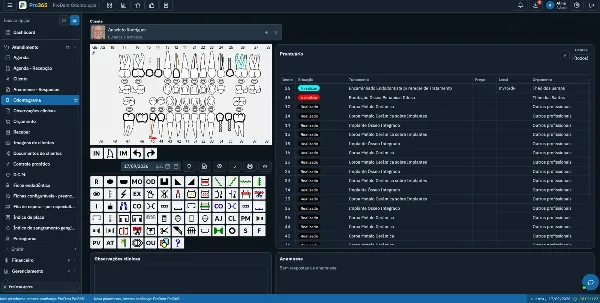
- digital dental records with history, images and charting
- support for treatment plan follow-up and patient relationships
- management reports for faster decisions
- support that understands your clinic's real routine
If a system falls short on these points, the cloud vs. desktop debate matters less, because the real problem is the tool's overall limitations.
Why this decision matters more than it seems
Choosing between cloud and desktop dental software affects more than the technical setup. It shapes team productivity, how predictable management is, the patient experience and even the clinic's ability to grow.
When the tool matches how you work, the clinic runs more smoothly. The schedule flows better, finances are clearer, data is easier to reach and the team does less rework.
When the choice is made without that strategic view, the system becomes one more layer of difficulty.
The best choice is the one that matches your clinic
If your clinic values mobility, continuous updates and flexible access, cloud dental software is likely the better fit.
If your situation calls for on-site operations, a centralized setup and less dependence on a constant internet connection, desktop may be the right call.
What matters most is not to decide based on the most generic promise, but on your clinic's real routine. When the system follows the way your team works, technology stops being just support and becomes part of your growth.
Pick the system that supports growth, not just today's routine
Between cloud and desktop dental software, the best choice is the one that fits your clinic's routine, makes management easier and supports growth with more control.
If your priorities are mobility, integrated processes, a clear view of management and day-to-day convenience, look for a solution that brings scheduling, patient records, billing, automation and expert support together in one place. HartSystem builds solutions designed for the reality of dentistry, helping clinics organize their operations and make decisions with more confidence.
Pro365 GO, the new ProDent, runs 100% on the web, so your schedule, records and KPIs are available wherever you are, with no local servers to maintain. Book a demo to see if it's the right fit for your clinic.