Dental appointment reminders and confirmations do different jobs, and the confirmation does more to cut no-shows because it asks the patient to act. A reminder helps patients remember; a confirmation tells your front desk who is actually coming. Used together and automated, they keep your schedule full and predictable.
Even so, they're among the simplest and most underused tools in dental clinic management. Many teams still face the same problem week after week: empty chairs left by patients who don't show up and don't call.
That hurts productivity, revenue and the organization of the whole day. When a patient doesn't come in, it isn't just one lost hour. It's a hidden cost that ripples through the entire operation.
The catch is that many clinics use only half of the solution. They send reminders but never confirm. Or they try to confirm by hand, with no set process and no way to scale it.
The real fix is to connect both steps inside your dental software, so patient communication is structured, automated and consistent.
Dental appointment reminders vs. confirmations: what's the difference?
Many clinics treat these two as the same thing, but they play very different roles in the patient journey.
An appointment reminder is preventive. It goes out when the appointment is booked and makes sure the patient puts it on their calendar. That lowers the chance of forgetting and helps avoid conflicts with other commitments.
An appointment confirmation is strategic. It goes out close to the visit, usually the day before, and asks the patient to respond. When the patient confirms, the visit is locked in. When they don't, the clinic still has time to act, rearrange the schedule and avoid an empty chair.
In short, a reminder informs, while a confirmation gives you real control over the schedule. When you use dental appointment reminders and confirmations together, the benefit is even greater.
Why does your clinic still have so many no-shows?
The problem isn't only patient behavior. It's also how the clinic handles its communication.
Many teams still rely on manual work: phone calls or messages sent with no standard timing or wording. That leads to inconsistency, missed follow-ups and little predictability.
When a clinic sends only reminders, it reduces forgetfulness but doesn't remove the risk of an absence. Without a confirmation, there's no commitment from the patient, only an expectation.
The American Dental Association (ADA) has published resources to help clinics reduce missed appointments, and in many offices no-shows take up a meaningful share of the monthly schedule.
So reminding isn't enough. You also need the patient to confirm.
The financial impact of dental no-shows
Seen through a financial lens, the problem becomes even more important.
Every lost slot is an opportunity you won't get back. Unlike other businesses, a dental clinic can't "store" appointments. If the hour goes by with an empty chair, that production is gone.
In a busy clinic, even a small no-show rate has a noticeable effect on monthly results. On top of that, it wastes team time, disrupts the day and creates rework.
This is exactly the kind of problem dental software solves well, by bringing predictability and control to the schedule.
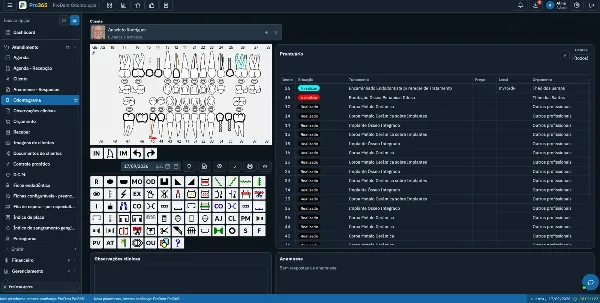
How to automate appointment reminders and confirmations with ProDent
The turning point comes when the clinic stops depending on manual tasks and starts using automation.
In dental software, the ideal workflow runs on its own:
- At booking: the reminder goes out to the patient automatically.
- Close to the visit: the system sends the confirmation, and the patient confirms with a single tap.
- No reply: the team gets an alert and can act quickly to protect the schedule.
This changes how the schedule is managed. Instead of finding out about problems at the last minute, the front desk can plan ahead.
A more organized, predictable dental schedule
When reminders and confirmations work together and run automatically, the effect on the schedule is immediate.
First, no-shows go down. Next, the team can see tomorrow's schedule clearly, so they can adjust times, fit in patients from the waitlist and keep chairs filled.
Internal communication improves too. Everyone works from the same up-to-date information, which means fewer mistakes and a smoother day.
This kind of organization doesn't take extra effort. It takes the right structure.
Benefits for your team and your clinic
| Reminders only | Reminders + confirmations | |
|---|---|---|
| Patient forgets the visit | Less likely | Less likely |
| Clinic knows who is coming | No | Yes |
| Time to fill an empty slot | Rarely | Usually |
| Predictability for the front desk | Low | High |
Your team works with more confidence and less stress from last-minute gaps in the schedule.
Clinic owners get more reliable data for decisions. With fewer no-shows, revenue becomes steadier and easier to forecast.
Patients notice the difference, too. Clear messages sent at the right time come across as professional, build trust and improve the overall experience. Many patients now expect this kind of automated digital communication from their healthcare providers.
Reminders and confirmations work best together
Dental appointment reminders and confirmations aren't just operational tools. They're a core part of running the clinic well.
Used on their own, each brings a small improvement. Connected inside your dental software, they make the schedule far more predictable.
The result is more control, fewer losses and a more efficient clinic, which supports steady, sustainable growth.
Pro365 GO, the web version of ProDent, sends appointment reminders and confirmations automatically and alerts your front desk when a patient doesn't reply. Book a demo to see how it works with your own schedule.