Dental software customer support is most useful when it goes beyond pointing to a button. Good support connects each question to how the clinic works, helps review settings, guides team training and shows how to turn what's recorded in ProDent into concrete action.
A feature only creates value once it's part of the routine. A clinic can have scheduling, billing, a CRM, patient records, KPIs and automations available and still keep side spreadsheets or use only part of the system when the team doesn't know what each function can do.
At HartSystem, ProDent comes with people-first support, personalized consulting and Pro365 AI. Each plays a different, complementary role. When the clinic arrives with a clear goal and applies the guidance in its routine, learning stops being a one-off and starts to strengthen patient care, management and case acceptance. For broader context, see the WHO's analysis of digital health competency frameworks.
The best support doesn't end when a question is answered. It creates value when the team can repeat the process with confidence, record it correctly and track the result.
1. Support, training and consulting: what's the difference?
All three can be part of the same journey, but each contributes differently to how the system is used.
- Support helps you find features, clarify how to use them and adjust settings or day-to-day routines.
- Training organizes learning for a function, a department or a workflow.
- Consulting connects the system's features and data to a clinic priority, such as clearing open items, improving the quality of financial records or recovering missed opportunities.
This distinction makes each contact more focused. If the front desk wants to keep appointments better updated, for example, it may be more productive to work directly on the workflow, the owners and how the information gets checked than to review the whole schedule at once.
2. Signs your clinic could get more out of ProDent
Getting more from the system doesn't mean using every screen. The point is to see where features you already have could simplify tasks, organize information and keep work moving. Some signs worth watching:
- The same information is recorded in ProDent, in spreadsheets and in personal messages
- Recurring tasks depend heavily on one person
- Management reports lose quality because appointments, treatment plans, payments or expenses are incomplete
- Pending treatment plans, recalls and new-patient inquiries have no owner or next step
- Features like Patient Tasks, Opportunities, CRM, provider payouts or clinical forms are known but not part of the real workflow
- The team contacts support only now and then and doesn't set aside time for training and improvement
These signs help you pick a concrete situation to bring to ProDent's support team. The more specific the scenario, the easier it is to turn guidance into practice and see a difference in the routine.
3. How to prepare a productive conversation with support
A good conversation starts before you reach out. Instead of saying only "we can't get this to work," the clinic can organize four pieces of information:
- Situation: which task the team is trying to complete
- Context: which role, user, period or type of record is involved
- What happens now: what the team sees today and where the workflow stops
- Expected result: what the team needs to be able to do after the guidance
Example: the front desk wants to follow up on pending treatment plans, but contacts are scattered. The goal of the call doesn't have to be "learn the whole CRM." It can be defining how to create or find the opportunity, log the history, assign a follow-up task and recognize when to move forward or close the follow-up.
A useful question to end every support call: who will do what, on which screen, at what moment, and which record will show the action is done?
4. How to train by department without splitting the clinic apart
Training by department makes learning more concrete, but the clinic needs to protect the handoffs between areas. Each team should understand its own responsibility and what information it hands to the next step.
Front desk
Can focus training on the schedule, reminders and confirmations, appointment status, recalls, Patient Tasks, patient registration and operational history. The goal is fewer things forgotten and continuity between shifts.
Treatment coordination and patient relationships
Can work on the CRM, Opportunities, lead sources, pending treatment plans, follow-up tasks and patient messaging. The focus is making every contact visible, owned and followed up without repetitive communication.
Billing
Can review the flow between procedures, treatment plans, payments received, payments made, overdue accounts and provider payouts. The goal is better-quality records before interpreting reports and KPIs.
Clinical team
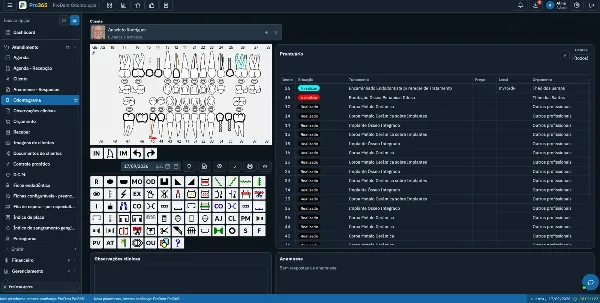
Can go deeper into patient records, the dental chart, medical history, images, documents, prescriptions, work or school notes, signatures and specialty forms. Guidance should respect professional responsibility and keep clinical records in the right place.
Management
Can use KPIs, reports, the Pro365 AI Consultant and process reviews to look into the schedule, production, treatment plans, finances and case acceptance. The manager's role is to turn what each department learned into shared rules, owners and follow-up.
5. Where Pro365 AI fits in
Pro365 AI has two roles. The Instructor helps users with questions about how to use the system, while the Consultant helps with questions about the data the clinic has recorded.
That combination can speed up autonomy and complement human support and internal leadership. A question about where to find a feature is different from a decision about goals, staff, investment or clinical care. AI helps find and explore information, consultants help apply the system to the routine, and the clinic stays responsible for defining processes and making decisions.
There's another important point: the quality of the answer depends on the quality of the records. Appointments without an updated status, treatment plans without a decision and incomplete payments can produce a distorted picture. Before asking for a broad diagnosis, check whether the data behind the question is complete and consistent. To see how ProDent handles patient data protection, visit our data security page.
6. How to tell whether support made the clinic more efficient
The feeling that "it got easier" is useful, but adoption gets stronger when the clinic tracks a few simple signals before and after the guidance. You don't need a complex dashboard to start.
- Fewer duplicate records outside the system
- Fewer repeat questions about the same task
- A higher share of essential fields filled in at the right moment
- Fewer open items with no owner or outcome
- Less time to find a history, document or management report
- More use of reports and KPIs in real decisions
- More continuity when the shift, user or responsible provider changes
Pick one or two signals tied to the topic you worked on. If the training was about tasks, track due dates, ownership and completion. If it was about billing, check that entries are complete and reconciled. If it was about the CRM, see whether each opportunity has a history, a stage and a next step.
7. How to make a new way of using the system stick
Changing routines can take clarity, time to learn and adjustments between the workflow on paper and the team's reality. The simpler and more practical the guidance, the more likely it is to become part of the day. A WHO Europe policy brief lists training, time and workload among the barriers that slow health workers' adoption of digital tools.
A useful approach is to pick one small workflow, show the benefit to the people who do the work, test it on a few cases and listen for where questions or rework come up. Then the clinic adjusts the agreement and retrains only the part that needs it. HartSystem's support team can help with that review, while leadership protects time for learning and keeps the agreed standard consistent.
8. How support can help with case acceptance
Case acceptance doesn't depend only on a sales tool. It's shaped by the quality of the whole operation. An up-to-date schedule avoids promising times that aren't available, an organized CRM keeps the lead's history, tasks put a deadline on follow-up, treatment plans with a clear status make negotiation traceable and KPIs help show where contacts stall.
When support helps the team use these features together, the clinic loses fewer opportunities to forgetfulness, delay or missing context. That doesn't guarantee every contact becomes treatment, but it improves the ability to follow each opportunity consistently and with respect for the patient's timing.
9. Your next step: bring one real workflow to support
Choose a situation that keeps repeating and still depends on a spreadsheet, a personal message or knowledge held by one person. Write down a real example, identify the department involved and define the result the team needs. Take that agenda to HartSystem's support team or consultants and ask for guidance focused on the workflow, not just one screen.
After the conversation, apply the process to a few cases, check the records and ask another authorized person to repeat the routine. If they can do it without rebuilding the explanation from scratch, the knowledge has started to become a capability of the clinic.
Don't wait for a question to turn into rework. Pro365 GO, the new ProDent that runs 100% on the web, comes with people-first support and consultants who know dental clinics. Book a demo to talk with our team.