Dentist commission payouts close cleanly when the monthly close follows five controls: a rule defined in advance, a clear release event, up-to-date financial data, a report you can trace by provider and period, and a statement shared with context. Without them, the same situation gets interpreted differently every month.
A percentage looks simple. In practice, the close gets sensitive when dentists have different agreements, treatments span several visits, patients pay in different ways and the billing team has to separate production, collections and what's owed to each provider.
Without a clear policy, questions pile up. Does a procedure that was performed but not yet paid count toward the payout? Should commission only be released when treatment is finished? Which period goes on the report? When those answers live in one person's memory or in side spreadsheets, rework, doubts and hard-to-explain totals follow.
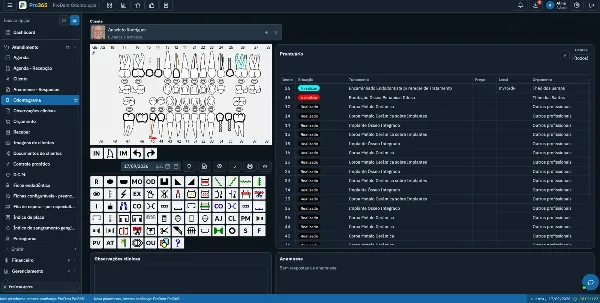
In ProDent, the clinic can set each provider's commission percentage and choose the payment criterion: when the procedure is performed, when payment is received, or after the treatment is completed and paid. The system calculates the amount based on what the patient actually paid and keeps history and reports by provider, period and payment method.
The five controls of a reliable commission payout
The feature only pays off when it's part of a process. These five controls turn the setup into a close routine the team can repeat and check.
1. A rule defined before the close
Start with the clinic's policy. For each dentist, record the agreed percentage and the event that makes the payout due. This has to exist before you calculate the period, because changing the criterion after seeing the total undermines the consistency of the close.
- Which percentage applies to the provider
- Which event releases the commission
- Which period the close will cover
- Who can review or change the setup
- How exceptions and adjustments will be documented
The operating rule in the system should reflect the agreement the clinic adopted. Contract, tax and employment questions need to be validated by qualified professionals, such as the clinic's accountant and legal counsel.
2. A release event that fits how you operate
The moment you choose to release commission affects cash flow, reconciliation and how you talk to the provider. So the best criterion isn't the fastest one. It's the one that faithfully represents the clinic's policy and can be applied without ambiguity.
| Criterion | What it means in practice | Check question |
|---|---|---|
| When performed | Completing the procedure is the milestone set for the payout | Were the visit and procedure recorded correctly? |
| When received | The patient's payment releases the corresponding amount | Was the payment posted and linked correctly? |
| After completion and payment | The treatment must be finished and the payment received | Is the treatment finished and was the expected amount actually received? |
3. Up-to-date financial data
Even a well-configured rule depends on consistent records. If a patient payment wasn't posted, a procedure is tied to the wrong provider or the treatment status wasn't updated, the close loses quality. Automation cuts manual math, but it doesn't fix missing data on its own.
Before generating the report, set aside a short check of payments, payment methods, the linked provider, procedure status and any adjustments. This step matters most when the criterion depends on the amount the patient actually paid.
4. A report you can trace by provider and period
A good close doesn't just show a total. It lets you rebuild how that total was formed. ProDent generates reports by provider, period and payment method, which helps billing check the result and answer questions from a history anyone authorized can look up.
The check can follow a simple order: validate the date range, confirm the provider, verify the criterion applied, review the items that make up the total and record any approved adjustment. The more predictable this sequence, the less the clinic depends on a single person to explain the process.
5. A statement shared with context
Transparency doesn't mean unrestricted access to financial data. It means giving the authorized provider the information they need to understand their own payout, within the permissions and rules the clinic has set.
When you share the close, state the period, the criterion, the base used, the documented adjustments and the channel for raising discrepancies. The conversation then starts from the same record instead of different versions of a spreadsheet.
A repeatable monthly close routine
Real time varies with the size of the clinic and the number of providers, but the sequence below gives you an objective starting point.
- Lock the period: set the start date, end date and expected payment date.
- Review the rules: confirm each provider's percentage and release event before generating totals.
- Clean up the records: check payments, procedures, linked providers and completed treatments that affect the calculation.
- Run the reports: filter by provider and period, then by payment method when it helps the check.
- Handle exceptions: document each adjustment with the reason, who approved it and the close it affects.
- Share and archive: send the statement through the authorized channel and keep the history for future reference.
What changes in day-to-day efficiency
When commission payouts are treated as an integrated process, the gain goes beyond the calculation. The clinic re-enters less data, shortens the check, improves traceability and can compare periods without rebuilding old spreadsheets.
- Fewer manual formulas and less risk of typos
- History organized by provider
- Payment criteria applied consistently
- Reports that support checking and communication
- Payouts connected to the clinic's financial routine
ProDent brings together payments received, payments made, commissions by provider, past-due balances, indicators and management metrics. That integration helps the clinic see commission payouts as part of its finances, not as an isolated calculation at the end of the month.
Mistakes that can still happen with automation
Automating the calculation doesn't remove the need for governance. The most common errors show up when the rule in the system doesn't match the current policy, when the team skips recording steps or when exceptions are resolved outside the workflow.
- Changing percentages without recording the effective date and approval
- Confusing production with collections
- Closing the period before updating payments or completed treatments
- Using a side spreadsheet as the main source and the system only as a cross-check
- Sharing more data than each role needs
- Settling discrepancies without recording the reason for the adjustment
If your clinic already uses the feature and still finds frequent differences, start by reviewing the setup, the quality of the data entry and the close routine.
When to ask HartSystem for help
Support is especially useful when the clinic is setting up payouts for the first time, adding new providers, revisiting its criteria or training someone else to run the close. Bring a real case to the support team, with the rule you want, the release event and the question you have about the check. That keeps the guidance specific and close to your routine.
For contract, tax, accounting or employment decisions, use ProDent as the tool to organize and calculate within the policy you've defined, and validate that policy with the specialists who advise your clinic.
Make next month's close a process anyone can follow
Pick one provider and a recent period. Check the percentage, identify the event that releases the payout, review the records that feed the calculation and run the report. If another authorized person can understand how the total was formed, the routine is getting clearer.
With Pro365 GO, the new ProDent that runs 100% on the web, commissions by provider sit inside the same financial workflow as payments and reports. Book a demo focused on your commission model.