Patient notes in dental software keep context from getting lost when a patient moves from one person or department to another. In ProDent, automatic entries record what the system did and manual notes explain what happened around it, so whoever picks up the conversation next doesn't have to ask the patient to start over.
At 8:10 a.m., the front desk notes that a patient asked for a callback about a treatment plan. At 11:40 a.m., the dentist issues a prescription. Early in the afternoon, the treatment coordinator sends a message through the Opportunities feature. The next day, someone else on the team talks to the same patient. What does that person need to know to continue the conversation without making the patient repeat everything?
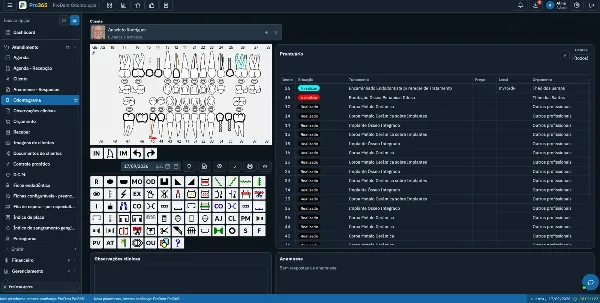
In ProDent, actions such as issuing a treatment plan, a prescription or a work excuse note, along with messages sent through the Opportunities feature, create automatic entries in the patient's history. The team can also add manual notes about relevant message conversations, visits, callbacks and other contacts. When both types of record work together, the history stops being a passive archive and supports continuity, speed and more consistent care.
Information gets lost in handoffs between people
A clinic rarely loses context in one dramatic moment. It happens little by little: at shift changes, in the handoff from the front desk to the clinical team, when a pending item goes back to the treatment coordinator or when someone has to pick up a contact made days earlier.
Without a centralized history, three quiet costs appear.
- The team spends time hunting for messages and papers or trying to remember who spoke with the patient
- The patient gets asked the same questions again and senses a lack of continuity
- Decisions are made with only part of the story
Patient notes help reduce this fragmentation because they bring system events and human context together in the patient's history. The automatic entry confirms that an action happened. The manual note explains the situation the event alone can't capture.
That difference matters. Knowing a treatment plan was issued is useful. Knowing the patient asked for a callback on Friday, prefers afternoon contact and is waiting for a specific answer makes the next step much clearer.
The continuity matrix: four questions for every note
A useful patient note doesn't need to be long. It needs to answer what the next person on the team would otherwise have to reconstruct. Before saving a manual note, check four questions.
What happened?
Record the event objectively. It could be an incoming call, an operational instruction, a pending item the patient mentioned or a callback attempt. Avoid vague labels such as "difficult patient" or "check later." Prefer observable descriptions, such as "patient asked for a callback about payment options for the treatment plan."
What context is needed?
Include only what changes the understanding of the situation. If there was a relevant message conversation, record the summary needed for continuity. There's no need to copy the whole conversation or duplicate information already organized elsewhere in the system.
Who needs to act?
The note should make clear which department or person will follow up, especially when the request moves from one area to another. The note preserves the context. When there's a future action with a deadline, the Patient Tasks feature can complete the workflow with an owner, date, time and alert.
What's the next step?
A useful timeline reduces ambiguity. "Wait for confirmation by Friday" guides better than "waiting." "Front desk calls back after the dentist approves" keeps two people from making the same call, or no one making it at all.
These four questions turn each note into a small unit of continuity: short enough to be used, complete enough to support the next decision.
When a manual note completes the story
Some important situations don't start as an automatic event. Daily work brings information by phone, by message, at the front desk or during a callback. In these cases, a manual note keeps context from being trapped in one person's memory.
Three uses stand out:
- Relevant message conversations, including WhatsApp
- A history of visits and callbacks
- Other contacts made with the patient
The rule shouldn't be "record everything." It should be "record what authorized team members will need to know to help, guide or follow up consistently."
A simple formula keeps notes objective.
Event + context + next step
Example: "Patient replied to the treatment plan message, asked to be contacted Thursday afternoon, treatment coordinator will call back."
This format beats pasting a long conversation, using subjective comments or writing sentences that don't point to an action. It also keeps the history from turning into a pile that's hard to search.
One timeline, different readings by department
The timeline is shared, but each area uses the context for a different purpose. Your standard needs to respect those needs without mixing operational and clinical records.
Front desk: continuity of service
The front desk needs to see previous contacts, relevant operational preferences, agreed callbacks and pending items that affect the next visit. A clear note keeps the patient from repeating requests and reduces reliance on stray messages.
Clinical team: context without replacing the clinical record
The operational history can show that a prescription, an excuse note or another contact was part of the patient's journey. Clinical progress, assessments, working diagnosis, treatment decisions, complications and other clinical information belong in the clinical record and its proper fields, under professional responsibility. A note should never become a shortcut that leaves the clinical record incomplete.
Treatment coordinator: follow-up with purpose
Entries for treatment plans and messages sent through Opportunities help the team see what has already been presented or communicated. A manual note can keep the reason for the next contact, the question that needs an answer and the step that depends on the patient's decision.
Management: quality of the process
For management, a coherent timeline helps review how departments pass information along. The goal isn't to police every sentence but to find where the process loses continuity, such as callbacks without context, duplicate messages or pending items that never reach an owner.
One case, from an isolated message to a sequence you can follow
Picture a patient who received a treatment plan, asked for a few days to think it over and then replied to a message sent through the Opportunities feature.
In a fragmented routine, the treatment plan is in the system, the reply is on one person's phone and the agreed callback is in someone else's head. When the patient gets back in touch, the team has to piece the conversation together under pressure.
With a well-used timeline, the sequence is simpler.
- ProDent automatically records that the treatment plan was issued
- The message sent through Opportunities creates a new entry in the history
- The team adds a manual note summarizing the relevant reply
- The next step is explicit; when there's a deadline and an owner, a Patient Task can organize it
- At the next contact, the authorized person checks the history and picks up from the right point
The value isn't only in finding information. It's in avoiding repetition, cutting prep time and keeping a consistent experience even when the patient deals with different people.
Five team agreements for better notes in ProDent
The feature only gains strength when the clinic sets a simple standard. Five agreements are usually enough to start.
- Record what's needed: include what changes continuity, without turning the history into full transcripts of conversations
- Write observable facts: avoid labels, judgments and abbreviations only one person understands
- State the next step: make clear what needs to happen after the note
- Use the right place: keep clinical information in the clinical record and use operational notes for service and relationship context
- Respect privacy and access: record only data relevant to the purpose and train the team on confidentiality and responsible access
A short training session with real examples from your clinic helps more than a long rulebook. The team can compare three recent notes, trim what's excessive, fill in what's missing and agree on a common way of writing.
Support turns an available feature into a consistent routine
It's common for a feature to be available but used differently by each person. One front desk team member records everything, another leaves the information in a message app, the treatment coordinator has their own style and the clinical team doesn't know what to expect from the timeline.
HartSystem's personal support and tailored consulting can help bring setup, training and process together. The conversation is more productive when the clinic brings concrete situations, such as a contact that lost context, a note that's hard to understand or a handoff between departments that tends to create rework.
If you already use ProDent, a good next step is to pick a recent case and review the full sequence: treatment plan, message, manual contact and callback. If you're evaluating dental software, a demo focused on the timeline shows how automatic and manual records connect to your real routine.
Good notes let anyone on the team pick up where the last person left off
Patient notes in dental software aren't just for storing comments. Used well, they preserve the context that lets the team continue care with clarity.
In ProDent, automatic entries for treatment plans, prescriptions, excuse notes and messages sent through Opportunities form the backbone of the timeline. Manual notes complete the picture with relevant conversations, visits, callbacks and contacts the team will need to find later.
The result is a routine that depends less on memory, paper and isolated messages. The front desk understands what happened, the treatment coordinator knows why to follow up, the clinical team finds operational context without replacing the clinical record and management can improve how information passes between departments.
With Pro365 GO, the new ProDent that runs 100% on the web, every handoff starts from the same patient timeline. Book a demo to see how notes and automatic entries fit your team's routine.