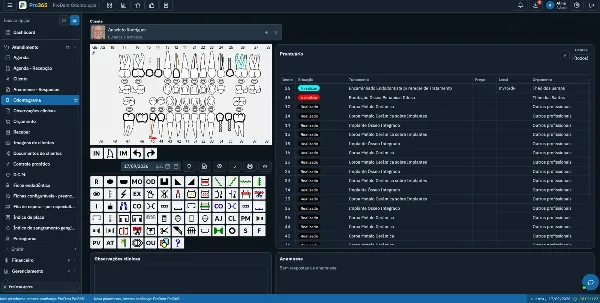
Dental software training works best as a 90-day adoption plan, not a single feature walkthrough. In the first 30 days, each area learns the essentials; from day 31 to 60, departments connect through CRM, messaging and tasks; and from day 61 to 90, management uses the data to check adoption and adjust the process.
Switching to or buying new software is only the beginning. What decides whether the clinic gains organization, productivity and reliable data is how the team uses the dental software every day.
Many clinics choose a good tool, complete the initial setup and learn the main features. But after a few weeks, part of the team drifts back to side notes, scattered messages, old spreadsheets or tracking outside the system. The result is familiar: an incomplete schedule, inconsistent financial data, fragmented patient records, a forgotten CRM and indicators that don't reflect reality.
Here's how to organize the first 90 days so the front desk, dentists, billing, treatment coordination and management all move forward together.
Why team training changes what the software delivers
Complete dental software can bring together scheduling, patient records, finances, CRM, WhatsApp, documents, indicators and tasks. But those features only pay off when they become part of the clinic's real workflow.
Training helps the team answer questions like:
- Who records each piece of information?
- When should the data go into the system?
- Which department follows up on each open item?
- What needs to be standardized?
- Which reports should management look at?
- How do we avoid side spreadsheets and parallel tracking?
- When should we ask support or consultants for help?
Without that alignment, the system becomes just another screen. With training, it becomes the center of the operation.
Days 1 to 30: build the foundation and stop improvising
The first month is about creating a minimum reliable routine. The priority isn't to use every feature at once. It's to make sure the essential areas are feeding the system correctly.
Front desk: schedule and appointment status
The front desk needs to master the schedule, same-day add-ons, follow-up visits, confirmations and appointment statuses. It's usually the team that keeps the clinic's day moving.
At this stage, define:
- How to book new appointments
- How to reschedule
- How to track confirmations
- How to mark arrival, in treatment, no-show or completed
- How to record important notes in the patient history
- How to avoid booking outside the system
When the schedule is used correctly, the clinic gains predictability. The team knows who's coming, who confirmed, who didn't show and which opportunities need follow-up.
Clinical team: records, intake forms and progress notes
Dentists and assistants need to understand that the digital patient record isn't just a file. It's the thread that keeps care continuous.
In the first 30 days, training should reinforce:
- Completing the medical history form
- Recording clinical progress notes
- Using the dental chart
- Attaching images and documents
- Issuing prescriptions and other clinical documents when applicable
- Checking the patient history before each appointment
- A minimum standard for records
The goal is simple: any authorized provider should be able to understand the patient's history without relying on someone else's memory.
Billing: treatment plans, payments and overdue balances
Billing is one of the areas where small data entry mistakes create big distortions in the indicators.
Early in adoption, train the team to follow a clear sequence:
- Record the procedure correctly
- Create the treatment plan and estimate
- Enter payments received
- Track open items
- Record payment methods
- Check overdue balances
- Review the basic reports
If the clinic wants to make decisions based on numbers, billing has to feed the system consistently from the first month.
Days 31 to 60: connect departments and gain productivity
Once the foundation is working, the second month should focus on connecting departments. This is when the clinic moves past basic use and starts seeing more value in the software.
CRM and new patient opportunities
Leads, pending treatment plans, inactive patients and overdue follow-ups shouldn't depend on memory or messages lost in a phone.
At this stage, training can move on to:
- Entering leads
- Pipeline stages
- Follow-up tasks
- Logging contacts
- Campaigns for open opportunities
- Filters by patient status
- Following up on treatment plans that weren't accepted
The clinic starts to see more clearly where it loses patients: before the first visit, after the exam, after the treatment plan or at the follow-up stage.
Messaging as part of the routine
WhatsApp shouldn't work as a channel cut off from the rest of the operation. When it's integrated with the system, it supports reminders, confirmations, campaigns, payment reminders, follow-ups and the patient relationship.
Training should show when to use messages to:
- Confirm appointments
- Remind patients of upcoming visits
- Recover patients who missed appointments
- Reactivate inactive patients
- Follow up on treatment plans
- Send payment reminders
- Remind patients about preventive visits
- Log important contacts in the patient history
The difference isn't just sending messages faster. It's connecting communication, scheduling, CRM and finances.
Tasks with an owner and a deadline
One of the biggest causes of rework is an open item with no owner. Someone needed to call the patient, request a document, ask for an X-ray, follow up on a treatment plan or reschedule a visit, but no one took it on.
In the second month, the team should learn to turn open items into tasks with:
- A reason
- An owner
- A deadline
- A link to the patient
- Context in the patient history
- An alert at the right time
That helps the clinic forget less and organize work without relying on side conversations between departments.
Days 61 to 90: use data to improve management
By the third month, the clinic should have enough data to start evaluating the operation more clearly. This is the time to bring management in more strategically.
Signs the team has adopted the system
Before expecting big results, the owner needs to look for signs of real use:
- Is the schedule complete and up to date?
- Are appointment statuses being used?
- Are no-shows recorded?
- Do treatment plans have a defined status?
- Are payments entered on time?
- Do patient records have progress notes?
- Are tasks being completed?
- Do the reports match what's really happening in the clinic?
These signs show whether the software has become routine or is used only partly, out of obligation.
A review meeting with the team
At the 90-day mark, hold a short meeting with the front desk, clinical team, billing, treatment coordination and management. The goal isn't to blame anyone. It's to adjust the process.
Good questions for the review:
- What has the team already adopted well?
- Where is there still parallel tracking?
- Which modules are underused?
- Which information arrives incomplete?
- Which reports still aren't reliable?
- Which training needs reinforcing?
- Which workflow should be simplified?
This conversation turns training into continuous improvement.
Support and consultants
Training also has to account for real questions that come up once the team uses the system every day. Learning a feature in a demo is different from applying it in a routine with patients, appointments, payments, follow-ups, documents and different providers.
That's why close support, personalized consulting and built-in guidance make a difference. For ProDent, HartSystem offers this follow-up as part of the package: complete software, hands-on support, personalized consulting and Pro365 AI to help with both using the system and reading the clinic's data.
How Pro365 AI supports team training
An important goal in software adoption is reducing dependence on the one person who "knows how to use the system." When the team has quick, step-by-step guidance and help interpreting data, use tends to spread across the clinic.
Inside ProDent, Pro365 AI can support this process in two ways:
- As an Instructor, helping users understand how to complete tasks in the system
- As a Consultant, helping read the clinic's data and indicators
It doesn't replace human training or internal organization, but it helps the team become more independent and resolve questions faster.
Mistakes that slow down dental software adoption
Even with a good tool, some habits keep the clinic from moving forward.
Training only one person
When only one person knows the system, the clinic is vulnerable. If that person is out, on vacation or changes roles, the operation loses momentum. Train by role: front desk, dentists, billing, treatment coordination and management.
Trying to use everything at once
Complete software has many features, but adoption needs to be gradual. Start with what holds up the daily routine, then move on to automations, reports and more strategic features.
Keeping side spreadsheets for no reason
Spreadsheets may still have a place in specific situations, but they shouldn't compete with the system as the main source of truth. If each department records things its own way, the data stops being reliable.
Never reviewing the indicators
Training the team and never looking at the data wastes the chance to improve. Indicators help find bottlenecks, forgotten modules and processes that need adjusting.
Treating support as an emergency line
Support and consulting shouldn't be called only when something "goes wrong." They can also help improve usage, review workflows and guide the team to get more out of the system.
How to tell if the training is working
Dental software training is working when the clinic sees practical changes, such as:
- Less lost information
- A more reliable schedule
- More complete patient records
- More organized finances
- Less rework
- Tasks with clear owners
- More clarity about new patient opportunities
- A more independent team
- Decisions based on real data
The best sign isn't that the team "knows where to click." It's that the routine becomes more organized because each area understands its role in the process.
Training doesn't end at go-live
Dental software training doesn't stop at implementation. It needs to continue through the first 90 days, following how the team actually works. When the front desk, dentists, billing, treatment coordination and management use the system with clarity, the clinic gets more reliable data, less rework and more control over the operation.
Pro365 GO, the new ProDent that runs 100% on the web, brings scheduling, patient records, finances, CRM, WhatsApp, documents, indicators and Pro365 AI into one routine, with close support along the way. Book a demo to talk with our team.