Choosing secure cloud dental software means checking much more than whether you can log in from anywhere. Look for a system that gives each person their own login, sets permissions by role, runs continuous backups, records an action history and comes with training so your team uses it safely.
For a growing dental clinic, this is decisive. The schedule, patient records, financials, CRM, documents and KPIs hold sensitive information about patients and about the business. In the cloud, the clinic gains mobility and speed, but it also has to treat security as part of management.
Why dental data security has to be a priority
Worrying about dental data security isn't overkill. Clinics handle sensitive patient information every day: records, treatment history, exams, prescriptions, financial data, signed documents and visit notes.
A breach can expose exactly that kind of information, including records, prescriptions, diagnoses and procedures.
That's why security can't be treated only as a technical issue. For a dental clinic, protecting information depends on management practices: access control, well-configured user permissions, cloud backup, an action history and team training.
So when you evaluate secure cloud dental software, look beyond mobility. The key question is whether the system helps protect the whole routine: scheduling, records, financials, documents, CRM and KPIs.
Cloud security isn't only about where data is stored
Many clinics still judge the cloud by one question: "Is my data saved online?" That matters, but it's incomplete.
Secure cloud dental software has to combine three things:
- reliable infrastructure;
- access control for each user;
- a well-defined internal routine.
Without that combination, a clinic can have a modern tool and still run with generic logins, overly broad permissions, former employees' accounts still active or financial information visible to people who don't need it.
In practice, security depends as much on the system as on the way the team uses it.
1. Authorized access: each person has their own login
The first mistake to avoid is a shared login. When several people sign in with the same user, the clinic loses traceability. It becomes hard to tell who changed an appointment, who edited a payment, who opened a patient record or who updated a profile.
Ideally, each team member has their own access, tied to their role. That keeps the team organized and builds a culture of accountability.
At the front desk, for example, access may center on the schedule, appointment confirmations, patient registration and visit status. In billing, the priority is payments, overdue accounts, associate payouts and reports. The clinical team needs patient records, dental charting, images, documents, health history forms and visit notes.
The logic is simple: each person should reach what they need to do their job well, without opening areas that aren't part of their routine.
2. Role-based permissions: security without slowing the team down
Security shouldn't turn into red tape. If permissions are too restrictive, the team starts looking for shortcuts outside the system. If they're too open, the clinic takes on unnecessary risk.
The balance comes from setting permissions by role.
A front desk coordinator may need to view the schedule, register patients, send confirmations and check patients in, but may not need full financial reports. A dentist may need to review records, attach images, fill out forms and issue documents, but not necessarily change administrative settings. A clinic manager may need a broad view of scheduling, financials, CRM, KPIs and productivity.
This matters even more in multi-location clinics, larger teams or clinics managed remotely. The more people use the system, the more important it is to separate responsibilities.
3. Backup and updates: the technical foundation of continuity
Another essential point in secure cloud dental software is data continuity. A clinic can't depend on manual backups that only happen when someone has time.
Continuous backups and automatic updates reduce operational risk because they take away a task that, if forgotten, can put clinical history, the schedule, documents and financial information at risk.
With ProDent in the cloud, HartSystem offers exactly that: access from anywhere, automatic updates and continuous backups. The clinic runs with more peace of mind and less dependence on a single computer or on manual security routines.
One caveat: backup doesn't replace access governance. Backup protects the availability and recovery of data. Permissions, users and training protect how that information is used day to day.
4. Action history: traceability to fix problems and learn
Mistakes happen in any dental clinic: an appointment rescheduled to the wrong time, a payment entered incompletely, a note added to the wrong patient or a document attached without a standard.
When the system logs actions and keeps a central history, the manager can investigate what happened and fix the process. That changes the conversation. Instead of relying on memory or blame, the clinic works with facts.
Traceability also helps with training. If the same kind of error keeps happening, the problem may not be the person but a lack of guidance on the right workflow.
5. Training: the security layer many clinics forget
A poorly trained team can turn even a good system into a fragile routine.
That's why security in cloud dental software also means training. The front desk needs to know how to confirm appointments, update status and avoid duplicate patient profiles. Billing needs to follow the right flow from treatment estimate to payment and overdue accounts. The clinical team needs to document in the patient record in a consistent way. Management needs to track KPIs and review access regularly.
This is where human support and personalized consulting make a difference. A clinic doesn't just need a password to get into the system. It needs guidance to turn the system into a secure routine.
How to review your clinic's security
A good review can start with a few simple questions:
- Who still has access to the system?
- Are there accounts for people who no longer work at the clinic?
- Does each person use their own login?
- Do permissions match each user's current role?
- Are financials visible only to the people who really need them?
- Are patient records and clinical documents being filled out in the right place?
- Does the team know where to log notes, tasks, follow-ups and important contacts?
- Can managers track KPIs without side spreadsheets?
This review doesn't have to happen every day, but it should be part of management. Whenever the team grows, someone changes roles or people start working remotely, permissions need another look.
Where ProDent fits into this routine
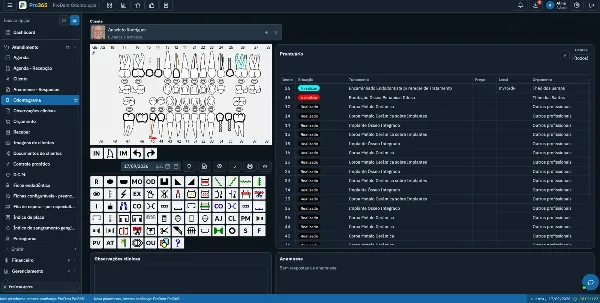
ProDent brings together the pieces of a more secure operation: scheduling, automated appointment confirmations, digital patient records, documents, financial management, CRM, KPIs, Pro365 AI, a cloud version, continuous backups, human support and personalized consulting.
That integration matters because it reduces side controls. The more a clinic scatters data across spreadsheets, loose messages, local files and handwritten notes, the higher the risk of loss, duplication and miscommunication.
Cloud software with protected backups helps the clinic centralize operations without losing control. The biggest gain, though, comes when the system is configured around how the team really works.
Choosing cloud software is a management decision
Security in cloud dental software isn't just a technical matter. It's a management decision.
The clinic needs to protect data, and it also needs to protect processes: who has access, who makes changes, who follows up, who decides and who reviews. When authorized access, role-based permissions, backup, traceability and training work together, the cloud stops being just about mobility and becomes a secure foundation for growth.
With Pro365 GO, the new ProDent that runs 100% on the web, each team member gets their own access and backups run continuously. Book a demo and review with our team how access should be set up in your clinic.